 by the items you want. Remember, you can “Select all” by checking the box at the top of the item list in Table view. The next step (choosing the format of your export) will be in the
  drop down menu.
Exporting Data
Exporting data is a role-based permission. If you don't see the option, that indicates you have not been assigned permission.
If you have export authority, data can be selected from Collections or from Tests/Presentations. Both data export sources are discussed below, as well as the different formats into which you may choose to export data.
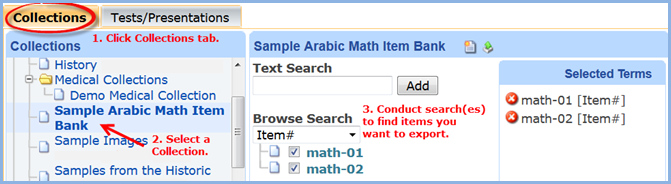
Collections tab -- You can choose specific items from Collections, or an entire Collection. Clicking the Collections tab and selecting a Collection. Next, conduct a search to find items you want. Check by the items you want. Remember, you can “Select all” by checking the box at the top of the item list in Table view. The next step (choosing the format of your export) will be in the drop down menu.
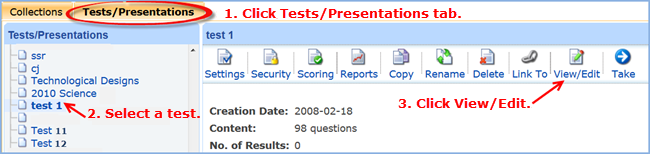
Tests/Presentations tab -- If you export from Tests/Presentations, you’re selecting a set of items that were formerly saved to the server and named in some way. Start by clicking the Tests/Presentations tab and selecting the name of the test you want. Click the View/Edit icon to retrieve it for exporting.
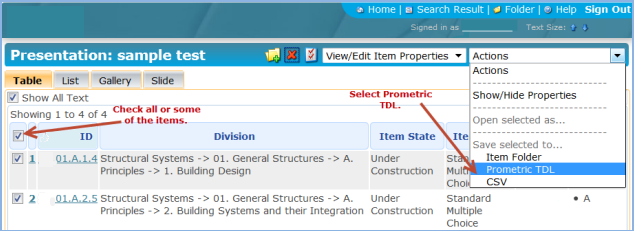
by any of the items you want. Remember that you can “Select all” by checking the box at the top of the item list in Table view. After checking items, the next step (choosing the format of your export) will be in the  drop down menu.
 drop down menu. Click Save selected to. . . Prometric TDL.
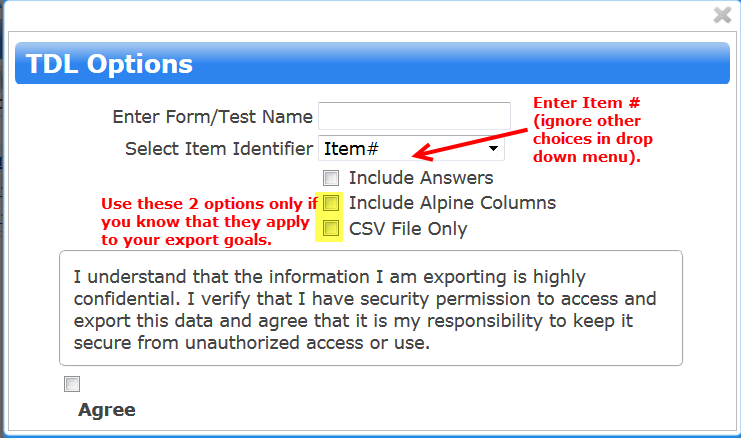
Selecting Prometric TDL will display the window shown below. If exporting a test, enter a name for your test. In the second field, as the Item Identifier, select Item # from the drop down menu. Note: Item# will probably be the top choice in the drop down—you can ignore the other choices. Check the box for Include Answers, if applicable. The other options may not apply to you; if they do, they are available.
Next, review the information regarding the high level of confidentiality of data you are exporting, and your responsibility to protect it. Check the box by Agree to confirm your understanding and acceptance of these terms.
The  button will appear. Click it, and a downloadable compressed (zip) file will be created that you can save to your local computer.